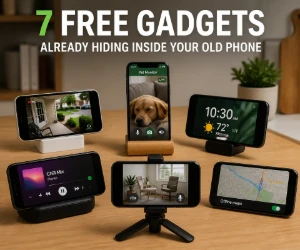
Turn One Old Phone Into Something Useful
A phone may feel outdated because it no longer runs the newest games or takes the best photos. That does not make its camera, display or speakers useless.
Choose the idea that solves a real problem in your home rather than installing a dozen apps and putting the phone back in a drawer.
1. A Simple Home Security Camera
Place the phone where its camera can watch an entrance, package area or room, then use a reputable camera app to view the feed from another device. This can be useful for casually checking an area while you are away.
It is not a replacement for a professionally monitored security system. Use a strong account password, keep the device on trusted Wi-Fi and avoid pointing it toward private spaces.
2. A Pet or Baby Monitor
An old phone can provide a live view of a sleeping baby, a new puppy or a pet recovering in another room. A stand or stable shelf may be the only extra item you need.
Keep the phone and charging cable safely out of reach. Treat it as a convenient way to look in, not as a medical monitor or substitute for direct supervision.
3. A Kitchen Screen
Keep recipes, cooking videos, shopping lists and timers on a dedicated phone instead of repeatedly touching your primary device with wet or messy hands.
Download favorite recipes or save them as PDFs so they remain available even when a website changes. A basic stand can keep the screen visible without taking up much counter space.
4. A Bedside Clock and White-Noise Machine
Use the phone as a dim clock, alarm, sleep-timer or white-noise player. Keeping these functions off your primary phone can also reduce the temptation to check messages after going to bed.
Turn on Do Not Disturb, lower the brightness and disable unnecessary notifications. Avoid placing an aging phone under a pillow or bedding while it charges.
5. A Dedicated Music and Podcast Player
Download music, podcasts or audiobooks over Wi-Fi and leave the phone connected to a speaker, exercise area or car audio system. This saves storage and battery on the phone you use every day.
Offline downloads are especially useful in a garage, basement, workshop or other place where Wi-Fi and cellular reception are unreliable.
6. A Webcam or Video-Call Screen
With a compatible app, an old phone can become a webcam for a computer that has a poor built-in camera. It can also serve as a dedicated screen for casual family video calls over Wi-Fi.
Position it at eye level and use headphones if the microphone creates an echo. Check app compatibility first, since very old operating systems may no longer support current calling services.
7. An Offline Travel and Emergency Device
Load the phone with offline maps, emergency contacts, travel confirmations, translation files and copies of non-sensitive information. It can become a useful backup if your primary phone is lost, damaged or out of battery.
Cellular and emergency-calling capability depends on the phone, network and location, so do not rely on an inactive device as your only way to call for help. Its most dependable role is storing information you can access offline.
Prepare the Phone Before Reusing It
- Remove the old SIM card unless you intentionally plan to keep cellular service on the device.
- Back up anything important and perform a factory reset if the phone still contains old accounts, messages or photos.
- Install available updates and only add the apps required for its new job.
- Use a screen lock if the device stores personal information or connects to online accounts.
- Check the battery: Do not continue using a phone that is swollen, separating at the case, unusually hot or visibly damaged.
Know When an Old Phone Is Too Old
A device that no longer receives security updates is better suited to offline music, recipes, clocks and other low-risk jobs. Avoid using it for banking, sensitive email, password storage or anything that exposes important personal information.
If the phone cannot hold a charge, safely run current apps or connect reliably, recycle it through an electronics collection program instead of leaving a damaged lithium battery in a drawer or household trash.
Get More Value From Things You Already Have
The easiest free gadget may be one you bought years ago. Reusing an old phone for one practical purpose can save money, reduce electronic waste and keep a useful device working longer.
Browse more freebie guides and tutorials for practical ways to find freebies, use rewards and stretch the value of everyday products.