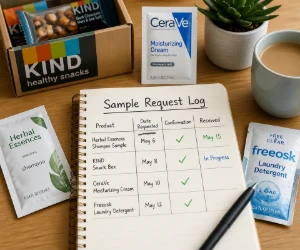
Save One Line Before You Close the Page
Use a phone note or a small spreadsheet, whichever you already open regularly. For each sample request, save four things:
- Product and brand: enough detail to recognize the delivery.
- Request date and offer link: so you can find the original information again.
- Status: requested, confirmed, shipped, or received.
- Delivery estimate or next step: only if the offer provides one.
A quick entry takes little effort while the details are still on your screen. There is no need for a separate app or an elaborate tracking system.
Keep the Confirmation With the Request
Submitting a form does not always mean a sample has been approved or shipped. Save the confirmation email, or take a screenshot of the final page, and record exactly what it says. An email folder called Samples keeps these messages easy to find.
If the offer asks you to confirm your email, complete a profile, or provide feedback, add that step to your note. Check against the stated delivery window before following up; if none is given, leave the estimate blank.
What would you actually enjoy trying? Explore OFree for free beauty samples, food samples, or baby samples to find options that fit your household.
When It Arrives, Save the Useful Detail
Mark the sample received, then add a few words after trying it: liked the scent, useful travel size, or would buy again. That small detail helps when you are later choosing between full-size products and can barely remember which little packet you enjoyed.
The exact product name, shade, or flavor is much easier to find again when you have a picture.
Ready to find something new to try? Browse OFree’s free sample boxes and welcome kits for more options.